Liquid Glass in Flutter: Do We Really Need It?
A critical reflection on the Liquid Glass effect in Flutter and its real necessity in mobile applications. Exploring when this feature adds value to the user experience and when it can be just unnecessary complexity to the project.
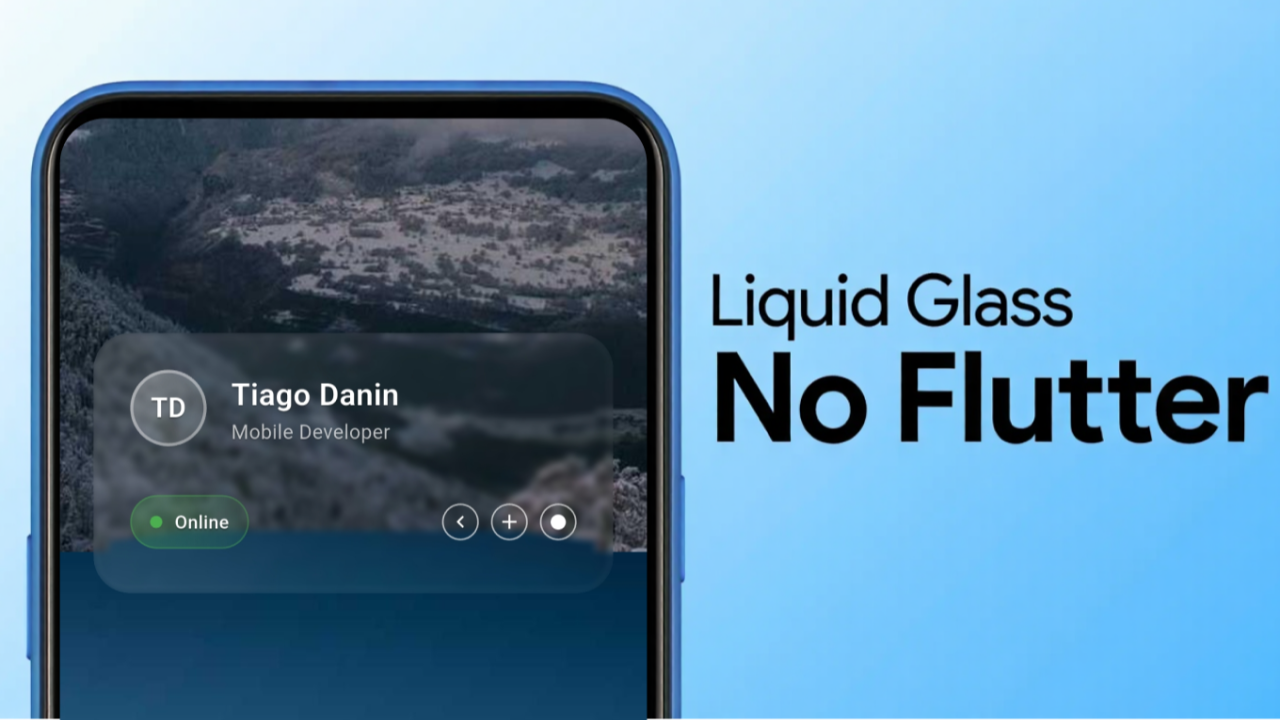
You know that moment when Apple releases something new and suddenly everyone is talking about it? That's what happened with Liquid Glass. If you followed WWDC 2025 or have already looked at iOS 26, you saw that new effect all over the operating system — wet glass, with blur. But do we really need this in Flutter?
It didn't take long for the community to start comparing: "In React Native, you just update Xcode and that's it, Liquid Glass in the app!" And it's true — since React Native uses native components, if Apple changes the look, your app already follows along. It seems like magic, but it comes at a price. Many apps might break out of nowhere. For example, the iOS navigation bar changed from fixed to floating, and that impacts many apps, which will start properly testing these new approaches more frequently once it leaves beta, as more devs and end users will have access.
Source: developer.apple.com/documentation/technologyoverviews/adopting-liquid-glass#Navigation
In Flutter, the approach is different — the framework draws everything from scratch on the screen as if it were a canvas, using the Skia engine or Impeller in more recent Flutter versions. This ensures your app's appearance will be consistent across all platforms, but it also means visual novelties from the operating system are not automatically inherited. Here at Idopter Labs, we've been through situations where the design looked different between Android and iOS, but with Flutter, these inconsistencies are rare — which is one of the main reasons we chose this stack.
Shaders: Flutter's Superpower
The Flutter team is known for being cautious before implementing new features — each feature needs to work on all supported platforms. So, before adopting something like Liquid Glass, it's necessary to evaluate whether it makes sense for the ecosystem as a whole. After all, Google, Meta, Facebook, and others have their own design systems, often going against what Apple proposes.
Even without native support, Flutter offers a powerful alternative: Shaders — small programs that run on the GPU and allow you to create advanced visual effects such as blur, distortion, glass, water, and much more. With GLSL shader support, it's possible to simulate something close to Apple's Liquid Glass in a customized way using Impeller. I created a shader to imitate Liquid Glass and shared the code in this repository.
https://github.com/TiagoDanin/Flutter-Liquid-Glass-Example
The shader, implemented in the shaders/glass.frag file, uses SDF (Signed Distance Functions) techniques to draw rounded shapes like a modal, applies refraction with different indices for each channel — creating the chromatic aberration effect (a type of glass lens distortion) — and blends everything with the screen background. The secret lies in manipulating textures and simulating how light behaves when passing through glass.
The Flutter integration is done in main.dart, using FragmentProgram.fromAsset to load the shader. The result is a card with rounded edges, reflections, and an incredible look — all running performantly thanks to the power of shaders.
If you want to try it, just check the repository and observe how the shader is loaded and applied to the widget. The code is open and can be adapted for different needs.
Native vs. Drawn: Which Is Better?
Using native components has its advantages, such as perfect integration with the operating system. However, this also brings risks: a single update to Android or iOS can make the app look strange, lose an effect, or even break. A classic example is elevation, present in Android buttons but absent in iOS native components. In Flutter, since everything is drawn, control is total — ensuring consistency and performance on all platforms. This way, elevation in Flutter exists on both Android and iOS.
My opinion? If the goal is to deliver a "premium Apple experience", go with SwiftUI. But if the focus is compatibility, consistency, and fewer headaches with updates, Flutter is the right choice.
Liquid Glass: Trend or Controversy?
Liquid Glass is visually impressive, but it's still a novelty. We don't know if apps beyond Apple's own will adopt it, and discussions about accessibility and readability have already emerged — since translucent backgrounds can make reading difficult, especially for people with low vision. Furthermore, the effect goes against the flat and minimalist trend that dominates the current design of most apps. And outside of a certain nostalgia for Windows Vista (who remembers Aero Glass?), there's nothing like it in other operating systems.
What do you think about Liquid Glass? Do you think it's here to stay or is it just another passing trend? Leave your opinion in the comments!
This article was translated from Portuguese with the help of an LLM. The original version may contain nuances not fully captured in this translation.